Speaker Icons: Evaluating a Clean and Functional Icon Set
In visual communication, icons serve as essential shorthand. When the topic involves audio, podcasts, sound, or broadcasts, a well-designed speaker icon becomes a critical visual anchor. A set of Speaker Icons, characterized by its simple and clean design, offers a specific solution for designers and content creators. This article examines what this icon set provides, its practical applications, and how it compares to other approaches for sourcing such graphical elements. The goal is to provide a balanced evaluation to help you determine if it fits your project requirements.
The Core Design Philosophy of Speaker Icons
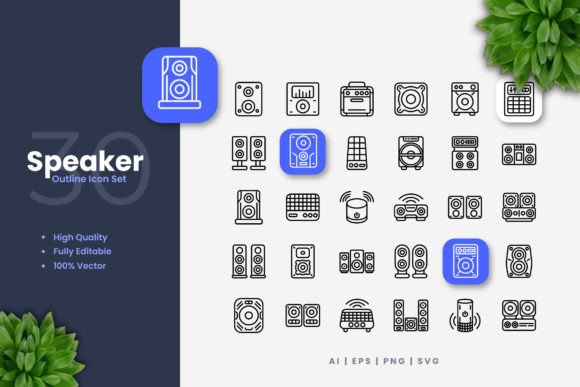
The Speaker Icons set is built around a principle of minimalism and clarity. The designs avoid excessive detail, complex gradients, or overly stylized forms. This results in icons that are immediately recognizable and function effectively at various sizes. The clean aesthetic ensures they do not compete with other visual elements on a page or screen, making them suitable for interfaces where information hierarchy is paramount.
What makes this set distinct is its foundation as a vector resource. Being provided in formats like AI, EPS, and SVG means every icon is constructed from mathematical paths and points, not fixed pixels. This is a significant differentiator from many free or low-cost icon sets found online that are often delivered as static PNG or JPG files. The vector nature inherently supports the claims of being customizable; stroke weight, color, and scale are fundamental properties you can adjust, not just wishful features.
Practical Applications and Use Cases
The advertised suitability for websites, mobile apps, books, social media, infographics, and print materials is accurate for a vector-based set. A simple, clean speaker icon can serve multiple roles across these mediums. On a website, it might denote a podcast subscription button or a volume control. In a mobile app, it could represent a sound settings panel. Within printed flyers or posters, it clearly indicates an audio-related event or product feature.
The utility extends beyond digital screens. Because the icons are vector-based, they can be scaled to any size without loss of quality, making them viable for large-format printing like banners. This versatility is a key strength. However, it's important to note that this adaptability comes from the file format and your access to vector software, not from the icons themselves. The set provides the raw material, but you need the tools and skill to manipulate it.
Comparing Acquisition Methods for Icons
When you need a speaker icon, you generally have several avenues. You could design one yourself, use a free icon from a web font or library, purchase a specialized set like this one, or commission a custom design. Each path has its tradeoffs.
Designing an icon yourself ensures perfect alignment with your brand but requires significant time and design expertise. Using a free icon from a comprehensive library (like FontAwesome or similar) is cost-effective and often includes broad compatibility, but the style may be fixed and not perfectly aligned with your project's unique aesthetic. Free icons also may not come in editable vector formats, limiting customization.
A purchased set, such as these Speaker Icons, sits between these options. It offers more stylistic control than a generic free icon because you can edit the vectors, but it requires a financial investment and the use of software like Adobe Illustrator or CorelDRAW. It provides a focused collection—100 variations of a single theme—which can be an advantage if you need multiple related icons (like speaker, mute, sound waves) in a cohesive style, but a limitation if you need a broader icon family for your entire project.
The Technical Specifications and Their Implications
The included files—source AI, EPS 10, SVG, PNG with transparency, and a readme—cover most professional needs. The AI and EPS files are standard for print and high-end graphic design workflows. SVG is crucial for modern web development, as it can be scaled, styled with CSS, and manipulated directly in code. The PNG files offer a convenient, ready-to-use format for quick placements in situations where editing isn't required.
The "Editable Stroke" feature is particularly noteworthy. It means the outline thickness of the icon shapes is not a fixed, baked-in property. You can make the lines thicker for bold emphasis on a poster or thinner for a subtle UI element on a mobile app. This level of control is typically absent in raster (PNG, JPG) icon sets and even in some vector sets where the stroke might be expanded into a shape.
A realistic consideration is the requirement for vector software. The promise of easy resizing, color changing, and editing is contingent upon your access to and proficiency with tools like Illustrator or CorelDRAW. For someone who only works in Photoshop or web-based design tools, the primary vector files (AI, EPS) may be less directly useful, though the SVG and PNG formats would still be accessible.
Strengths and Potential Limitations
The strengths of the Speaker Icons set are clear: high quality due to vector construction, deep customization potential, and format versatility for cross-media use. The 100 variations provide a good range of options within the speaker theme, likely covering different styles (outline, filled, with sound waves, minimalist) which can suit different tonal needs within a single project.
Potential limitations must also be considered. First, it is a niche set. If your project requires a comprehensive icon library covering actions, objects, and symbols beyond audio, this set alone will not suffice. You would need to integrate it with other icon sources, which could lead to stylistic inconsistency. Second, as noted, the full value is unlocked only with vector software expertise. Third, the "Preview Mockup is Not Included" note is a practical reminder; you are buying the core asset files, not demonstration templates or pre-made designs.
Determining the Right Fit for Your Project
When might these Speaker Icons be the right choice? They are a strong candidate for projects where audio is a central theme and a consistent, clean visual identity for that theme is required. Examples include a podcast network's website, an audio equipment manufacturer's marketing materials, or a music education app. If you already use vector software in your workflow and value the ability to tweak an icon's exact proportions, color, and stroke to match your layout perfectly, this set aligns well with that working method.
You might need another option if your budget is constrained and a free, good-quality speaker icon from a reputable open-source library meets your immediate need. Also, if you require a vast, ready-made suite of icons for a whole website or app UI, a broader icon font or complete UI kit would be more efficient, even if the speaker icon within that kit is less customizable. Finally, if your output is solely for web and you prefer to work entirely within code, a pure SVG icon from a repository that allows CSS styling might offer a more integrated workflow than downloading and manually editing an AI file.
In making a decision, weigh factors like the scope of your project (need for a single icon vs. a family), your design tools and skills, the importance of stylistic customization, and your budget. A set like Speaker Icons offers a specific solution that excels in flexibility and quality within its defined scope. It solves the problem of obtaining a professional, adaptable audio-related icon but does not claim to solve every icon-related need a designer might have. By understanding its distinct position compared to broader libraries or custom design, you can make a more informed selection for your visual assets.